
Schedule work on a project
Use an Event for work with a start and end time. Use a Reminder for something to remember at a single time.
Create the event
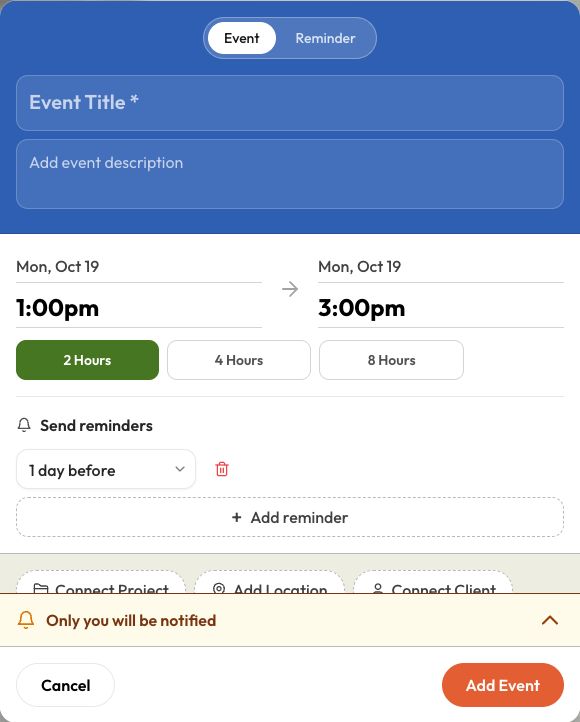
- Open Schedule and choose + Event or the + button. You can also choose Create → Event, or add an event from a project.
- Leave Event selected. Enter a title that tells your team what is happening.
- Set the start and end dates and times. The end must be after the start. Use a duration shortcut if it fits the job.
- Choose Connect Project to attach the event to the job. When no project is connected, you can add a location or connect a client separately.
- Use Assign Team for the people doing the work. Add a description if they need instructions.
- Review Send reminders and the notification summary. Expand the summary to check client or team recipients and delivery options before saving.
- Select Add Event. Open the saved event to confirm its time, project, and recipients.
Reminders and notifications
Event reminders can be set for one day, one hour, or 15 minutes before the event. Remove a reminder you don’t need. Connecting a client or assigning a teammate is not a substitute for checking the notification options.
If the summary says Only you will be notified, don’t expect the client to receive a message. Client notifications need a connected client, selected contacts, and the relevant delivery option enabled.
On your phone
Open Schedule and use its plus button. In Day or Week view, tap an empty time and then the new-event slot. Some controls move into menus on smaller screens; the saved event still contains the same job details.
If you can view the calendar but cannot add an event, ask your business admin to check your scheduling access.
Last updated
Related articles
Still need a hand?
Tell us what you’re trying to do and where you got stuck.
Contact Dave support