
Read invoice balances and payment history
Open an invoice from Invoices or its project to see its total, balance, status, and Payment history. This is the invoice’s payment ledger: payments, payment attempts, refunds, balance adjustments, and manual corrections in one timeline, with the newest activity first.
Read the timeline
Each money entry shows its amount, date, and status, plus the payment method or memo when available. Expand Payment details for information such as the provider, reference, failure explanation, or teammate who recorded a manual payment.
Choose View receipt when available. For a balance adjustment without a receipt, its three-dot menu can offer Generate receipt. A receipt may take a moment to become available after an action finishes.
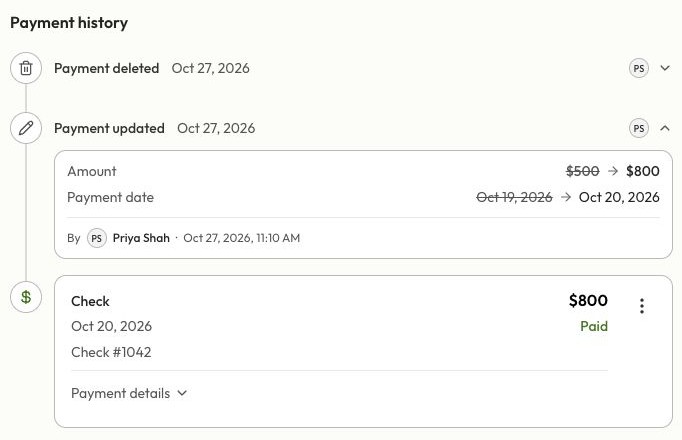
Payment updated and Payment deleted entries explain corrections; they are not additional money received or returned. The business sees this audit history and internal notes. The client portal does not show the correction audit or internal notes.
Know what each amount means
| Amount | What it tells you |
|---|---|
| Invoice total | The bill, including its discount and tax. |
| Balance due | What the client still owes after payment credits, applied deposits, chargebacks, and write-offs. |
| Collected | Money received, less completed refunds. Writing off a balance does not increase collected money. |
| Refunded | Money returned. A voluntary refund reduces collected money without adding that amount back to the balance due. |
| Written off | An unpaid amount closed with Resolve remaining balance, without a payment. |
| Deposit applied | Credit from a deposit already received. It reduces the bill without collecting that money again. |
For example, a $1,000 invoice paid in full and then refunded $200 has $800 net collected and no balance due. If only $600 was paid before a $100 refund, the original $400 unpaid balance remains outstanding; the refund does not cancel it or increase it to $500.
A chargeback is different: a lost payment dispute can reopen the amount owed. A returned bank payment can also remove its payment credit. Review the updated balance before asking the client to pay again.
Understand payment and invoice statuses
- Pending or Confirming means a payment attempt needs more time or confirmation. Check again before retrying or recording it manually.
- Paid on a payment means Dave has credited the invoice. It does not necessarily mean the payout has reached your business bank account.
- Failed, Cancelled, or Returned requires checking the payment details and the current balance. A failed attempt is not money received.
- Partial means the invoice still has an unpaid balance. Refunding a payment on a partly paid invoice does not close the remainder.
- Resolved means the remaining balance was written off. It does not mean the customer paid that amount.
- Partial Refund or Refunded describes a refunded invoice with no remaining balance due.
Refund requests may also show processing or review states. Pending refunds reserve part of the refundable amount; an accepted request is not a reason to record the refund again.
Choose the next action
| What happened | Use |
|---|---|
| The customer paid outside Dave | Record Payment. |
| You entered a manual payment incorrectly | Edit or delete the manual entry. |
| You need to return money | The refund flow for the original payment. |
| You agree not to collect the rest | Resolve remaining balance. |
| The bill should be cancelled | Mark as Void, where eligible. |
When QuickBooks is connected, payments, refunds, and write-offs can each have their own sync badge. A paid payment can still have a QuickBooks sync error; these statuses describe different things.
Last updated
Related articles
Still need a hand?
Tell us what you’re trying to do and where you got stuck.
Contact Dave support